The Consent Pop-Up helps encourage customers to add shipping protection before checkout. You can fully customize its content, appearance, and positioning to match your store branding.
Steps to Customize the Consent Pop-Up:
1️⃣ Open the App Settings
→ Go to your Shopify Admin → Apps → ShipSure → Settings → Customize tab.
→ On the top bar, select the Consent Popup option.
2️⃣ Enable the Consent Pop-Up
→ Toggle the Consent Popup switch ON to activate the feature.
3️⃣ Customize the Content
Title: This is the main heading. (e.g., “Shipping Protection”)
Subtitle: Add a short, descriptive message. (e.g., “Add peace of mind by covering this order against loss, theft, or damage in transit for #mplan_price#.”)
Dynamic Variables: Use #mplan_price# to dynamically display the protection fee.
Button Labels: “No Thanks” and “Add Protection” (shown in preview; fixed text).
4️⃣ Style the Pop-Up
You can control how the pop-up looks by changing the following:
Text Color: Choose HEX color codes (e.g., #000000 for black text).
Text Weight: Adjust font thickness for Title and Subtitle separately.
Font Size: Customize the size (e.g., Title: 14px, Subtitle: 13px).
Background Color: Set background color (e.g., #f5f5f5 for light gray).
Border Settings:
Border Color (e.g., #d4e0e4)
Border Radius for rounded corners (e.g., 8px)
Border Width (e.g., 1px)
Spacing: Customize Margin (e.g., 30px) and Padding (e.g., 15px)
5️⃣ Popup Position
→ Choose where the pop-up should appear on your store from the Position dropdown (e.g., Top Right).
6️⃣ Preview Your Design
→ On the right-hand side, you’ll see a Consent Popup Preview so you can visualize your changes before saving.
7️⃣ Save Your Changes
→ Click the Save button at the top right of the screen to apply your customization.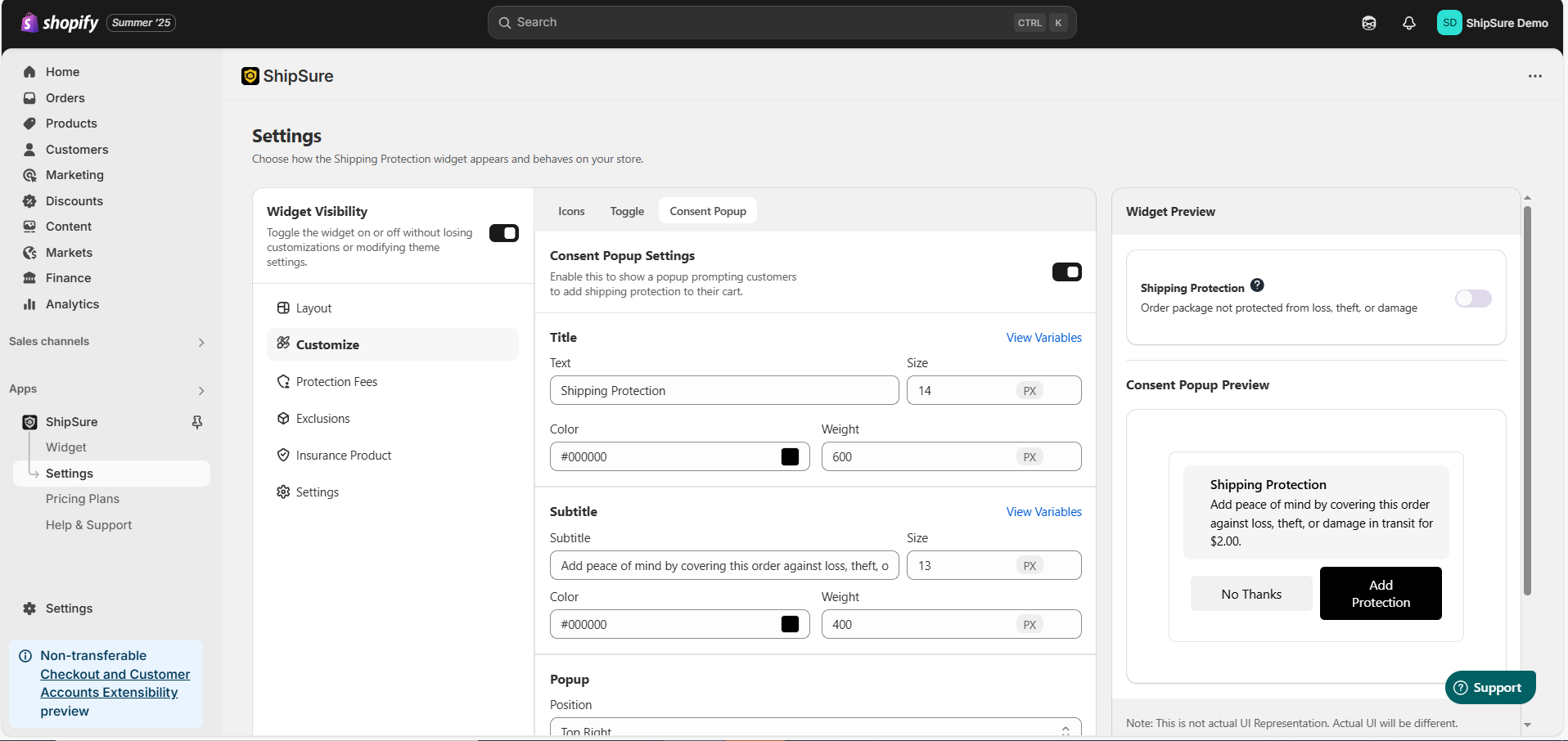
Sample Default Text:
Title: Shipping Protection
Subtitle: Add peace of mind by covering this order against loss, theft, or damage in transit for #mplan_price#.
Buttons: Add Protection | No Thanks
Need Help with Setup?
If you face any issues while setting up or customizing the Consent Pop-Up, feel free to reach out to our support team:
Email: hello@shipsure.in
We’ll be happy to assist you and ensure your setup is completed smoothly.
Was this article helpful?
That’s Great!
Thank you for your feedback
Sorry! We couldn't be helpful
Thank you for your feedback
Feedback sent
We appreciate your effort and will try to fix the article