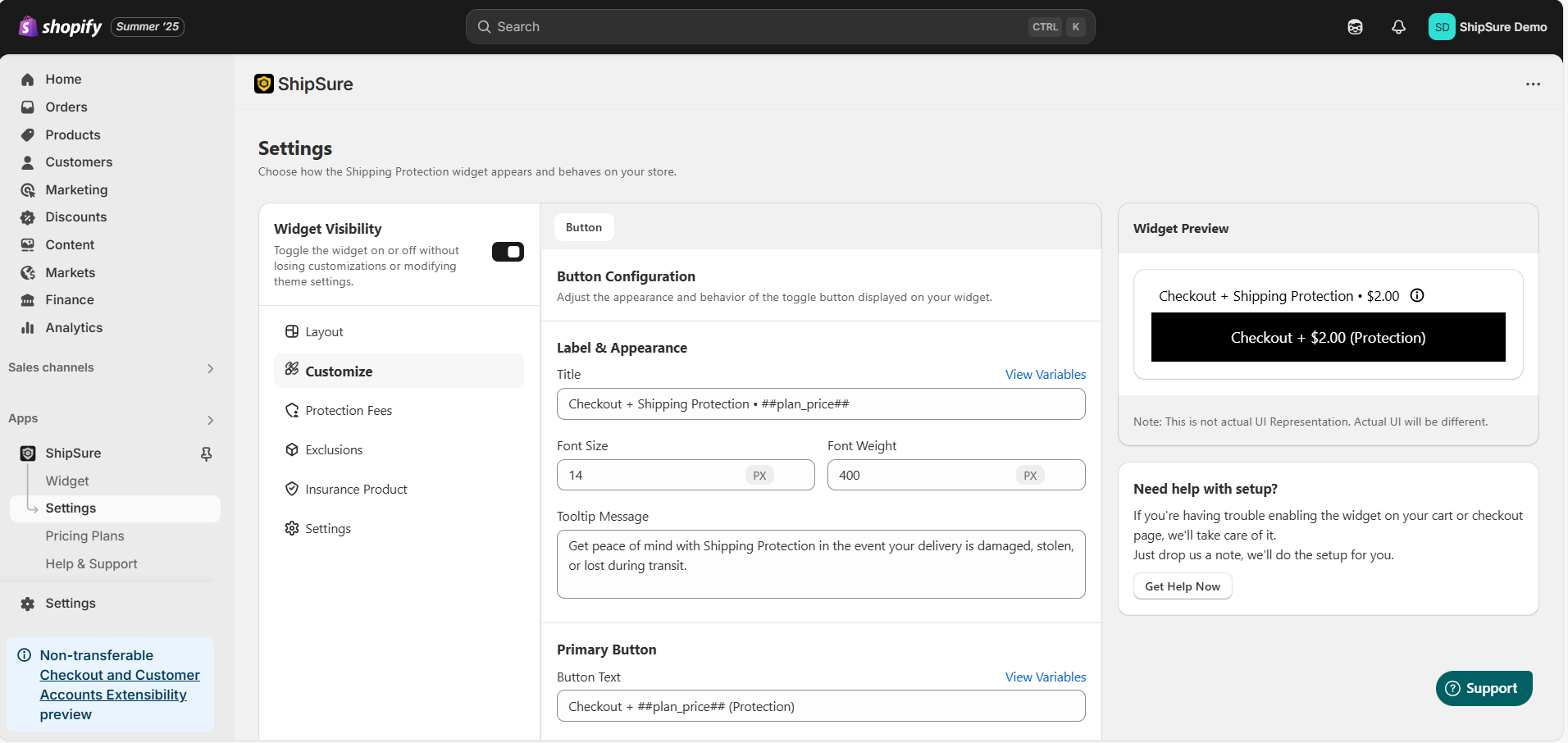
With ShipSure, you can fully customize the Button Widget to match your store’s branding and offer a seamless experience to your customers. Follow the steps below to adjust its look and content:
1️⃣ Navigate to Button Customization
Go to Apps → ShipSure → Settings in your Shopify Admin.
Click on Customize from the left-hand menu.
Ensure the Button option is selected under Layout Options.
2️⃣ Edit Label & Appearance
Title (Label):
This is the text shown next to the Shipping Protection fee on the widget.
Example:Checkout + Shipping Protection - ₹{{plan_price}}Font Size & Weight:
Adjust the text size and thickness to match your store theme.Tooltip Message:
Add a short description explaining what Shipping Protection covers.
Example: “Get peace of mind with Shipping Protection in case your delivery is damaged, stolen, or lost during transit.”
3️⃣ Customize the Primary Button
Button Text:
Customize the button’s displayed text.
Example:Checkout + ₹{{plan_price}} (Protection)Text Size & Colors:
Adjust size, color, and hover color of the button text.Background Color & Hover Color:
Set colors to match your brand.Padding, Margin, Border Radius:
Customize spacing around and inside the button, along with rounded corners.Border Color & Thickness:
Use this if you want an outlined button style.
4️⃣ Enable or Disable the Secondary Button (Optional)
The Secondary Button allows users to proceed to checkout without adding protection.
You can toggle this ON or OFF depending on your store’s user experience preferences.
5️⃣ Preview Your Changes
Use the Widget Preview section on the right-hand side to see a live preview of how the button will appear to your customers.
6️⃣ Save Customizations
Once you’re happy with the appearance, click Save to apply the changes to your storefront.
Recommended Default Texts:
Label:
Checkout + Shipping Protection - ₹{{plan_price}}Button Text:
Checkout + ₹{{plan_price}} (Protection)Tooltip Message: Protect your order from loss, theft, and damage during delivery.
Need Help?
If you face any issues while setting up the Claim Page or using ShipSure, feel free to reach out to our support team:
Email: hello@shipsure.in
We’ll be happy to assist you and ensure your setup is completed smoothly.
Was this article helpful?
That’s Great!
Thank you for your feedback
Sorry! We couldn't be helpful
Thank you for your feedback
Feedback sent
We appreciate your effort and will try to fix the article